
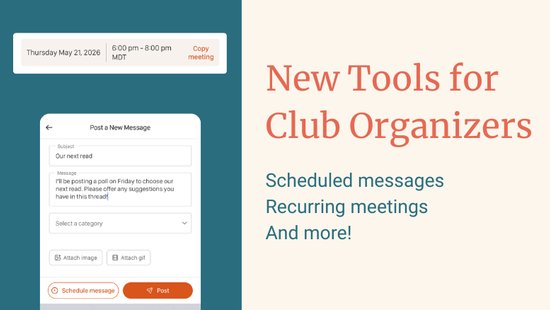
If you run a book club, you know the drill: create a new meeting for next month, type in the same details you typed last month, remember to send a reminder, repeat. Three new Bookclubber features are designed to cut down that overhead so you can spend more time on the books.
Duplicate a Past Meeting
Not every club runs on a fixed schedule, but many meetings share the same book, location, or format. Now you can copy any past meeting instead of starting from scratch. Tap or click "Duplicate Meeting" on any existing meeting, review the pre-filled details, and adjust whatever needs to change. The new meeting is only created once you confirm.
Meeting duplication is available to Bookclubber Premium clubs on web and in the app.
Schedule Messages in Advance
For Pro Plus clubs, you can now compose a club message today and choose a future date and time for it to post automatically. The message stays hidden from the club feed until the scheduled time, then appears with all the usual notifications. You can view, edit, or cancel any pending message before it goes live.
This is useful for weekly discussion prompts, event reminders timed to a specific day, or any club communication you want to plan ahead. Immediate posting still works exactly as before.
Scheduled messages are a Pro Plus feature available on web and in the iOS and Android apps.
Recurring Meetings
If your club meets on a regular schedule, you can now set up a recurring meeting series instead of creating each one manually. Choose bi-weekly, monthly, or quarterly, set how long the series runs, and Bookclubs creates all the meetings at once. Each one appears in your club's schedule automatically with no extra steps from you.
When plans change, you can edit or cancel a single occurrence, all upcoming meetings in the series, or the whole series at once.
Recurring meetings are a Bookclubber Premium feature available to club admins on web and in the iOS and Android apps.
Where to Find These Features
For recurring meetings and meeting duplication, go to your club's meetings page and open the create or edit meeting flow. For scheduled messages, look for the scheduling option in the club message composer on web or in the app.
Head to your club now to try them out. 📚
Not a Bookclubs member yet? Join Bookclubs and find or start a book club today.
COMMENTS
Laura R
Jun 07, 2026 - 4 months
Please add recurring WEEKLY meetings.